Session Bean facade to an Entity EJB
Step by step example of creating a session bean as business facade to an entity EJB. It is a complete working example.
General
Author:
Sebastian Hennebrüder
Revised by Sascha Wolski
Date:
Updated January, 10th 2005
Updated November 1st 2004
First Edition October, 1st 2004
Source code:
http://www.laliluna.de/assets/tutorials/session_bean_facade_ejb_xdoclet.zip
http://www.laliluna.de/assets/tutorials/session_bean_facade_ejb_xdoclet.pdf
Using the source code.
The source code does not include any libraries but the sources. Create a web project, add the libraries manually or with the help of MyEclipse and the extract the sources we provided to your project.
Development Tools
Eclipse 3.x
MyEclipse plugin 3.8
(A cheap and quite powerful Extension to Eclipse to develop Web Applications and EJB (J2EE) Applications. I think that there is a test version availalable at MyEclipse.)
Database
PostgreSQL 8.0 Beta or MySQL
Application Server
Jboss 3.2.5
Introduction
You are an EJB expert and going to develop a very complicated library system. For this system you need two EJBs.
Book Entity EJB
provides the book class
LibraryManager Session EJB
This is a session facade providing business logic methods like
-
lendBook
-
returnBook
A session fasade does not return the Book bean itself but a value object. This is another design pattern.
So good luck!
Create a EJB project
Type ?Strg + n? to open the ?new project? dialog.
Select an EJB Project.
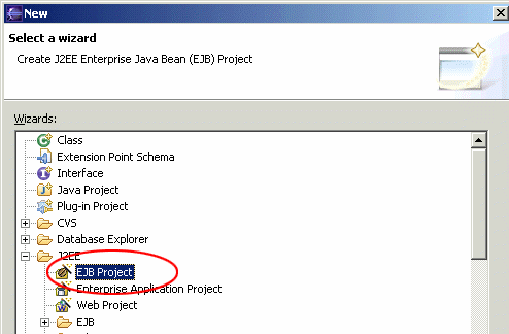
Give a name to your project and get it created.
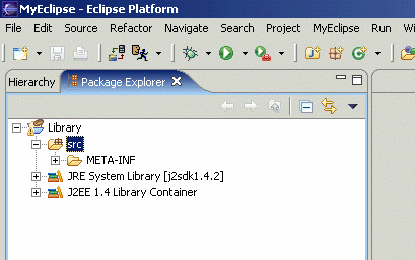
You will see the following in your package explorer.
Configure xDoclet
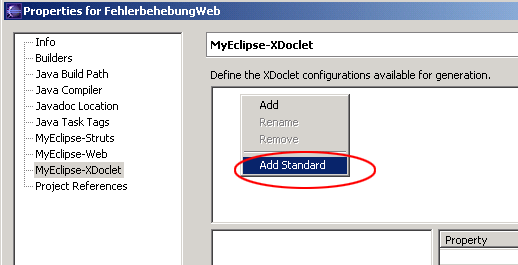
Go to the project property dialog (Strg + Enter).
Choose ?MyEclipse Xdoclet?.
Right click in the right upper window and choose ?Add Standard?.
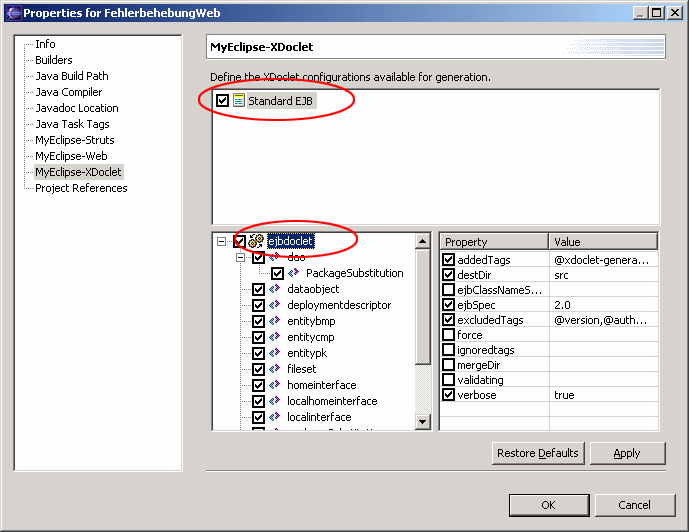
Choose "Standard EJB" in the list.
Click on ?Standard EJB? than right click on ?ejbdoclet?.
Choose jboss from the list.
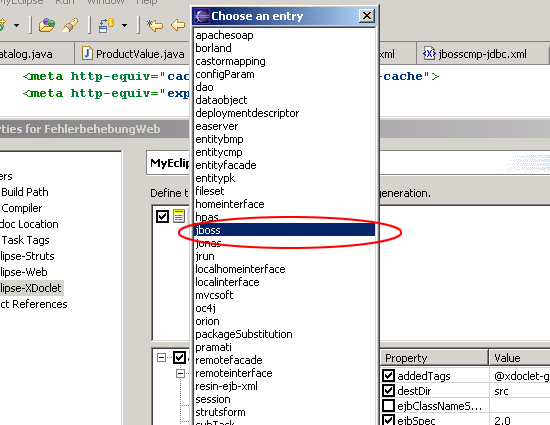
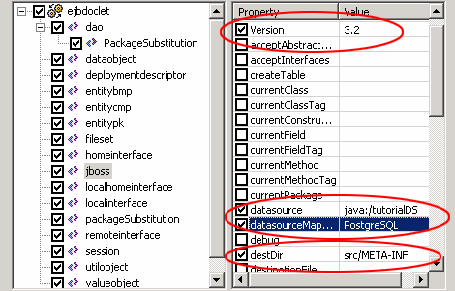
Add the following information
-
Jboss Version, it is 3.2 for all 3.2.x
-
the destDir (where to create the jboss.xml and jbosscmp-jdbc.xml)
-
You need a datasource, we will prepare this later. Take a name here like "java:/tutorialDS"
-
Datasource Mapping. Tells the Application Server what kind of field is used in the DB for a jdbc-type.
Find out the name yourself by looking into {jboss_home}serverdefaultconfstandardjbosscmp-jdbc.xml.
mysql is mySQL for example. But we are using PostgreSQL!
Create a Database
Do it how ever you like.
Create the Datasource
Copy the driver (you will find it on http://www.postgresql.org) to
...jboss-3.2.4serverdefaultlib
Look for example configuration files in
jboss-3.2.4docsexamplesjca
Copy the file postgres-ds.xml to
jboss-3.2.4serverdefaultdeploy
change the content of the file to
<datasources>
<local-tx-datasource>
<jndi-name>tutorialDS</jndi-name>
<connection-url>
jdbc:postgresql://localhost:5432/database-name
</connection-url>
<driver-class>org.postgresql.Driver</driver-class>
<user-name>username</user-name>
<password>password</password>
</local-tx-datasource>
</datasources>
Create an Entity EJB.
We will create a Book EJB providing three fields an id, a title and a status field called available.
Type ?Strg + n? or make a right mouse click and select EJB.
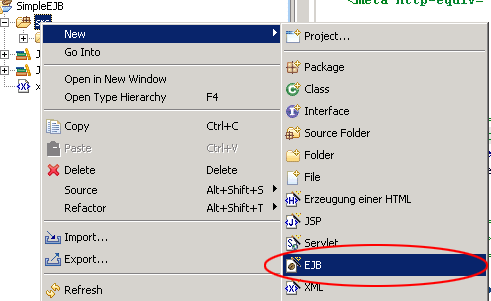
Give it a nice package name AND make sure that it ends with
.ejb
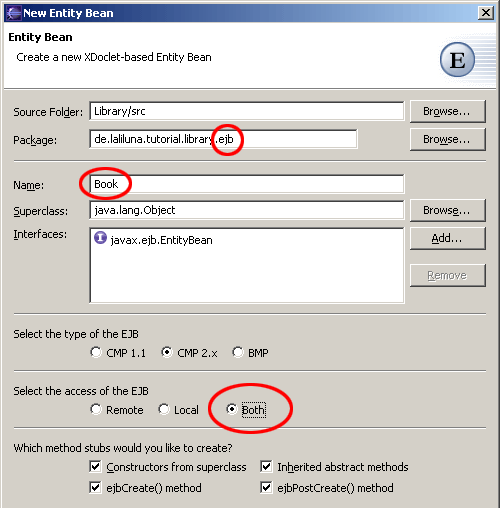
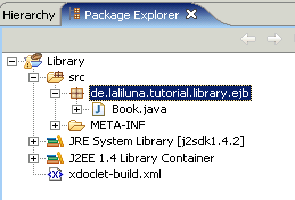
Now you should have a nice basic EJB class from which xDoclet may generate your interfaces later.
Change the ejb tag in front of your class to:
* @ejb.bean name = "Book"
* type = "CMP"
* cmp-version = "2.x"
* display-name = "Book"
* description = "Book EJB"
* view-type = "both"
* jndi-name = "ejb/BookHome"
* local-jndi-name = "ejb/BookLocalHome"
* primkey-field = "id"
* @ejb.persistence table-name = "tbook"
* @jboss.persistence create-table = "true" pk-constraint = "true"
* @ejb:util
* generate="physical"
* @ejb.value-object match = "*"
*/
We are lazy so we will have jboss create our table.
Further have a look at ejb.value-object, we will use the value object design pattern and the VO is created for us.
Add the following getter, setter and the javaDoc comments to your sourcecode.
public abstract class Book implements EntityBean {

/** The EntityContext */

private EntityContext context;

/**
* @ejb.interface-method view-type = "both"
* @ejb.persistence column-name = "fid"
* @ejb.pk-field
*
* @return
*/
public abstract Integer getId();

/**
* @ejb.interface-method view-type = "both"
*
* @param id
*/
public abstract void setId(Integer id);
/**
* @ejb.interface-method view-type = "both"
* @ejb.persistence column-name = "ftitle"
*
* @return
*/
public abstract String getTitle();

/**
* @ejb.interface-method view-type = "both"
*
* @param title
*/
public abstract void setTitle(String title);
/**
* @ejb.interface-method view-type = "both"
* @ejb.persistence column-name = "favailable"
*
* @return
*/
public abstract boolean getAvailable();

/**
* @ejb.interface-method view-type = "both"
*
* @param available
*/
public abstract void setAvailable(boolean available);
Change the ejb create method in your class. Make sure it returns an Integer. You always have to return your primary key class. We declared the Integer field id as primary key so it has to be Integer.
public Integer ejbCreate() throws CreateException {
Random random = new Random();
this.setId(new Integer(random.nextInt()));
return null;
}
I am not sure if that primary key is really good, but good primary keys are not the scope of the tutorial.
Create the interfaces with xDoclet.
Calling xDoclet the first time
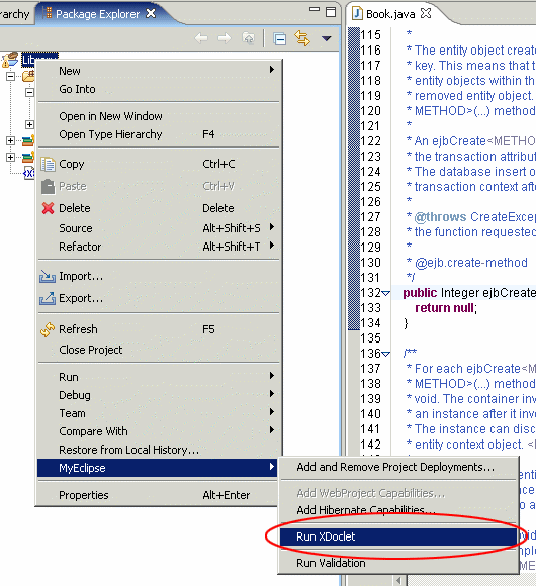
right click on the project in the package explorer, click MyEclipse and then ?Run Xdoclet?.
Now all your home and class interfaces and the xml files are generated.
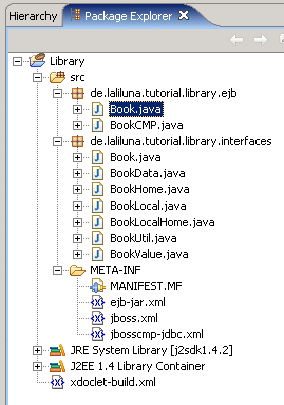
When you have a look at the package explorer, you should find all the interfaces and xml files.
If you don`t see the new files, you have to refresh the content of your project.
Once you have the BookValue class available, add a declaration for the getters and setters in your book bean.
If you don't this, we will not be able to access the value object later.
/**
* declare interface method to access the valueObject
*
* @ejb.interface-method view-type = "both"
*
* @return
*/
public abstract BookValue getBookValue();

/**
* declare interface method to access the valueObject
*
* @ejb.interface-method view-type = "both"
*
* @param name
*/
public abstract void setBookValue(BookValue bookValue);
Then run Xdoclet again.
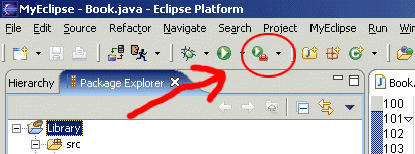
Click this symbol to run Xdoclet again.
Start Jboss and deploy your entity EJB.
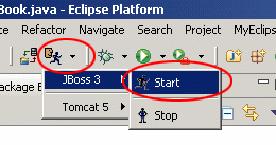
Start your jboss server.
You should find a message like the following in your console.
23:08:29,593 INFO [tutorialDS] Bound connection factory for resource adapter for ConnectionManager 'jboss.jca:service=LocalTxCM,name=tutorialDS to JNDI name 'java:/tutorialDS'
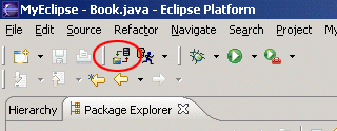
Click the symbol to call the deployment dialog.
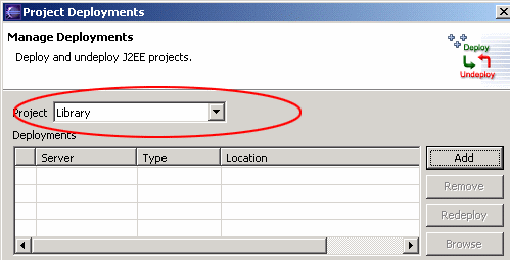
Choose your project.
Add the Jboss server.
As deploy type I prefer the exploded archive. From jboss 3.2.5 the deployment is immedately updated.
Only from time to time you have to call a redeployment. A server restart is rarely needed.
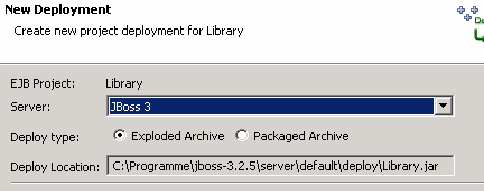
Deploy your Entity EJB. When everything is OK the console talks to you:
23:21:54,000 INFO [EjbModule] Deploying Book
23:21:54,406 INFO [Book] Created table 'tbook' successfully.
23:21:54,406 INFO [EJBDeployer] Deployed: file:/C:/Programme/jboss-3.2.5/server/default/deploy/Library.jar/
Creating the session EJB
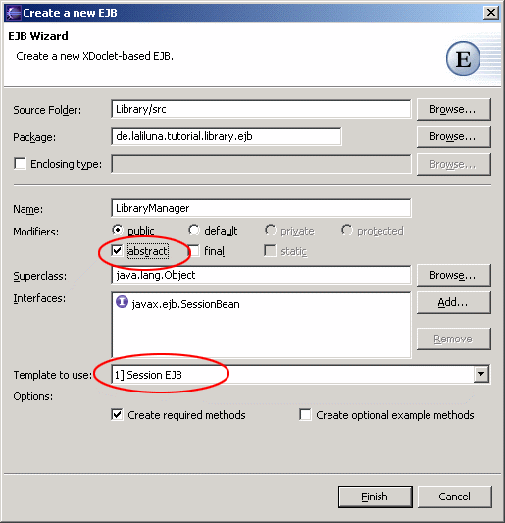
Create a new EJB (see the book EJB).
Make sure its abstract and choose Session EJB as template.
Change the viewType of the EJB.
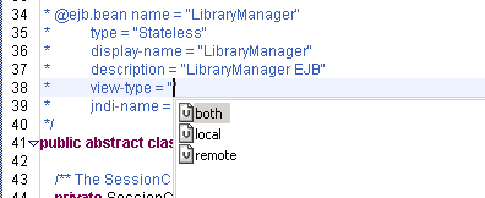
The viewType declares
what interfaces will be generated.
Local interfaces
Remote interfaces
or both.
Local interfaces
with a local interface your EJB can only be called from clients within the same Virtual Machine.
Remote interfaces
Clients can call you from remote machines and from local machines.
Local interfaces are much faster as they are direct pointers to your classes. So you should prefer them in your application. For testing purpose, create both interfaces.
* @ejb.bean name = "LibraryManager"
* type = "Stateless"
* display-name = "LibraryManager"
* description = "LibraryManager EJB"
* view-type = "both"
* jndi-name = "ejb/LibraryManagerHome"
*/
public abstract class LibraryManager implements SessionBean {
Implement the business logic. Make sure that your business logic functions throws an EJBException.
/**
* returns a Value Object from the book when the book exists and is
* available, else returns null
*
* @ejb.interface-method view-type = "both"
* @param primaryKey
* @return @throws
* EJBException
*/
public BookValue lendBook(Integer primaryKey) throws EJBException {

BookLocal bookLocal = null;

try {
// HS 30.09.2004 get a context to look the home interface by JNDI

InitialContext context = new InitialContext(System.getProperties());

BookLocalHome bookLocalHome = (BookLocalHome) context
.lookup(BookLocalHome.JNDI_NAME);

bookLocal = bookLocalHome.findByPrimaryKey(primaryKey);
} catch (FinderException e) {
// laliluna 30.09.2004 do nothing but log message
e.printStackTrace();
} catch (NamingException e) {
// laliluna 30.09.2004 do nothing but log message
e.printStackTrace();
}

// laliluna 30.09.2004 book is availabe than return valueObject else
// return null
if (bookLocal != null && bookLocal.getAvailable()) {
bookLocal.setAvailable(false);
return bookLocal.getBookValue();
}

else
return null;
}

/**
* returns book to library and sets available to true
* @ejb.interface-method view-type = "both"
*
* @param bookValue
* @throws EJBException
*/
public void returnBook(BookValue bookValue) throws EJBException {

// laliluna 01.10.2004 check params
if (bookValue != null) {
BookLocal bookLocal = null;

try {
// HS 30.09.2004 get a context to look the home interface by
// JNDI
InitialContext context = new InitialContext(System
.getProperties());

BookLocalHome bookLocalHome = (BookLocalHome) context
.lookup(BookLocalHome.JNDI_NAME);

// laliluna 01.10.2004 find bookObject by primary key
bookLocal = bookLocalHome.findByPrimaryKey(bookValue
.getPrimaryKey());
// laliluna 01.10.2004 return book and set availability to true
bookLocal.setAvailable(true);
} catch (FinderException e) {
// laliluna 30.09.2004 do nothing but log message
e.printStackTrace();
} catch (NamingException e) {
// laliluna 30.09.2004 do nothing but log message
e.printStackTrace();
}
}
}
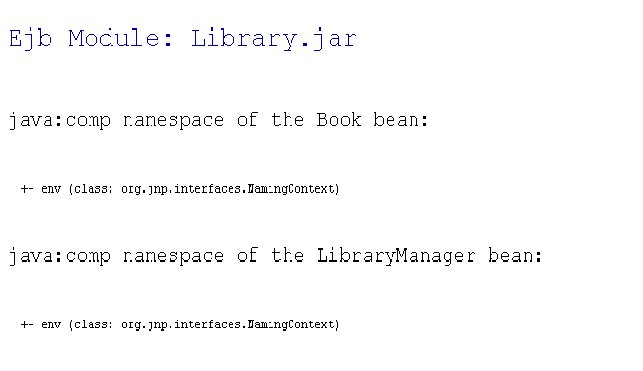
Run Xdoclet and check in the console that your EJBs are properly deployed.
Checking the deployment
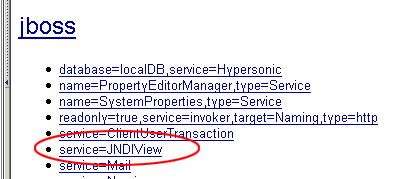
-
open http://localhost:8080/jmx-console in your browser
-
select service JNDI-View
-
select operation "list"
You can see your bean module now and it should also occur in the global JNDI namespace.
Test your EJBs
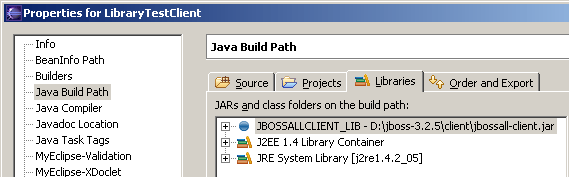
Create a Java project. Open the project properties and add the library j2ee and the jboss client jar (see picture)
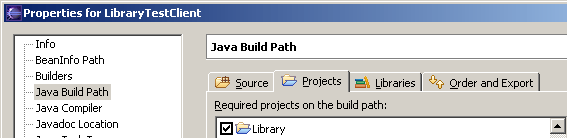
Add the EJB project in the project tab to the build path.
Create a simple java class with a main method like the following one.
package de.laliluna.tutorial.library.test;

import java.rmi.RemoteException;
import java.util.Properties;

import javax.ejb.CreateException;
import javax.ejb.EJBException;
import javax.naming.Context;
import javax.naming.InitialContext;
import javax.naming.NamingException;
import javax.rmi.PortableRemoteObject;

import de.laliluna.tutorial.library.interfaces.*;

/**
 * @author laliluna
 *
 */
public class TestLibraryManager {

  private Properties properties;

  public TestLibraryManager() {
    // [laliluna] the properties specifies where the JNDI lookups for the EJBs can be made
    properties = new Properties();
    properties.put("java.naming.factory.initial",
        "org.jnp.interfaces.NamingContextFactory");
    properties.put("java.naming.factory.url.pkgs",
        "org.jboss.naming:org.jnp.interfaces");
    properties.put("java.naming.provider.url", "jnp://localhost:1099");
    properties.put("jnp.disableDiscovery", "true");
  }

  public static void main(String[] args) {
    TestLibraryManager libraryManager = new TestLibraryManager();
    libraryManager.doTheTest();
  }

  public void doTheTest() throws EJBException {

    // [laliluna] a object we will use to convert the home interfaces
    Object object;
    try {
      // laliluna 01.10.2004 get context to find homeinterfaces in jndi
      // context
      Context context = new InitialContext(properties);

      // laliluna 01.10.2004 create a dummy book
      object = context.lookup(BookHome.JNDI_NAME);
      /*
       * [laliluna]
       * when using the remote interface you have to use the PortableRemoteObject to convert the object to your class/interface
       *
       */
      BookHome bookHome = (BookHome) PortableRemoteObject.narrow(object, BookHome.class);
      Book book = bookHome.create();
      book.setAvailable(true);
      book.setTitle("Learning EJBeing");

      // laliluna 01.10.2004 dummy variable to hold a book primaryKey
      Integer bookPrimaryKey = book.getId();

      // laliluna 01.10.2004 getting a session EJB
      object = context
          .lookup(LibraryManagerHome.JNDI_NAME);
      LibraryManagerHome libraryManagerHome = (LibraryManagerHome) PortableRemoteObject.narrow(object, LibraryManagerHome.class);
      LibraryManager libraryManager = libraryManagerHome.create();

      // laliluna 01.10.2004 lend a book
      System.out.println("book available:" + book.getAvailable());
      BookValue bookValue = libraryManager.lendBook(bookPrimaryKey);
      System.out.println("book available:" + book.getAvailable());
      libraryManager.returnBook(bookValue);
      System.out.println("book available:" + book.getAvailable());

    } catch (EJBException e) {
      e.printStackTrace();
    } catch (NamingException e) {
      e.printStackTrace();
    } catch (CreateException e) {
      e.printStackTrace();
    } catch (RemoteException e) {
      e.printStackTrace();
    }
  }

}
Run it and have a look at the database to check the results.
That's it, congratulations!