Spring DAO with JBDC, Eclipse, PostgreSQL, MySql
This tutorial explains how to implement the design pattern Data Access Objects (DAO) to access a Database with JDBC. In addition the tutorial shows how to use Inversion of controll to improve your code quality. We will use the Spring framework.
Do you need expert help or consulting? Get it at http://www.laliluna.de
In-depth, detailed and easy-to-follow Tutorials for JSP,
JavaServer Faces, Struts, Spring, Hibernate and EJB
Seminars and Education at reasonable prices on a wide range
of Java Technologies, Design Patterns, and Enterprise Best Practices Improve your development quality
An hour of support
can save you a lot of time - Code and Design Reviews to insure that the best practices are being followed! Reduce solving and
testing time
Consulting on Java technologies Get to know best suitable libraries and technologies
General
Author: Sebastian Hennebrueder
Date: December, 09 2005
Used software and frameworks
Eclipse 3.1
Spring 1.2.6 http://www.springframework.org
Recommended
MyEclipse 4 http://www.myeclipseide.com
Source code: http://www.laliluna.de/download/eclipse-spring-jdbc-tutorial.zip
PDF version of the tutorial: http://www.laliluna.de/download/eclipse-spring-jdbc-tutorial-en.pdf
Table of Content
Spring DAO with JBDC 1
General 1
What is the Spring framework? 2
Application and business logic 2
Transaction Management 2
Integration of resource files 2
Integration of messaging 2
JMX (Java Management Extension) 3
Integration of JDBC, Hibernate, JDO, EJB to access databases 3
Web application development 3
Aspect Oriented Programming and Inversion of Control 3
Springs advantages 4
Little invasive 4
Good Design 5
Introduction to our example 5
Prepare the project 5
JDBC Libraries 9
Configure logging 9
Create the database and tables 10
The structure 10
Why interfaces are useful? 11
Creating the basic classes 12
Class book 12
Interface and Implementation 13
Adding inversion of control 16
Configuration in Java classes 16
Configuration with Spring config files 18
Test your application 19
Outlook 20
Replacing the datasource with a connection pool 20
Object Relational Mapping 20
Alternative implementation 20
Adding transactions to our application 20
Copyright and disclaimer 20
What is the Spring framework?
Spring is a lot of things at the same time and I will try to give you a short understandable overview. A full overview to all functions can be found in the documentation which is included in the download of the Spring framework.
Application and business logic
Spring provides functionality to implement a well designed business layer for your application. It helps you implementing standard design patterns like DAO or designing to interfaces and provides features you need in all standard application and which allow you to integrate different services. If you are familiar with EJB you may find a lot of features you know from EJB. I speak about the advantages of Spring later in this tutorial:
Transaction Management
You can use a wide choice of transaction management solutions including Hibernate, database transactions or the Transaction Management from your Websphere or JBoss application server (JTA). The selection of a transaction management solution is not very invasive, i.e. you can easily change the transaction management without changing much of your code.
Integration of resource files
A complete library to read your resource and configuration files.
Integration of messaging
A complete library to create Emails or messages using a Java Messaging System. JMS is included in most J2EE application servers like JBoss, Websphere etc. A JMS allows you for example to send messages including objects (classes) between applications. For example your Internet shop applications sends a message including the order class. The message is read later by your enterprise resource planning application.
JMX (Java Management Extension)
JMX allows you to remote access other application from within your application. Imagine a local Java application calling a remote server to start jobs, getting information or do what ever you like. JMX allows you to connect your application between multiple servers across the Internet or a LAN.
Integration of JDBC, Hibernate, JDO, EJB to access databases
Spring allows to integrate any of this solutions to access your database. The interface is well designed and lets you easily replace a JDBC database access with a Hibernate based database access.
Hibernate, JDO and EJB are solutions to map database data to classes, e.g. Reading a line of the table book and writing it to a object of class type book. This allows you to use classes instead of result sets in your application and is considered as good design, because your application keeps being object oriented.
If you use JDBC access, Spring provides an abstract exception layer. If you change your database from PostgreSQL to Oracle you do not have to change the exception handling from OracleDataAcception to PostgresDataException. Spring catches the application server specific Exception and throws a Spring dataexception.
Web application development
Spring provides his own web framework but also allows to use Struts, Velocity, FreeMarker, Struts Tiles or Libraries to create XML, Excel, PDF documents or reports. You can even develop an adapter for your own web framework to use Spring for your business logic.
Aspect Oriented Programming and Inversion of Control
AOP is all about adding aspects to your code. So what are aspects? The same as Cross Cutting Concerns? What are ...? I do not want to tease you but give you frequently used terms in the world of AOP.
Cross Cutting Concerns are functions you need throughout your application. This can be for example transactions, logging or functions you need only for a limited time like measuring of process time to benchmark your application.
Very often you implement this code in each method of your business logic. You will probably have already seen code like this or even written code like this.
	public void doMyBusiness(){
		long startTime = 0;
		if (DO_MEASURING)
		 startTime = System.currentTimeMillis();

		if (DO_LOGGING) {
			Logger log = Logger.getLogger(this.getClass());
			log.debug("I am in my DoBusiness method");
		}

		/* faked code
		 if (! Transactionmanager.transactionOpen())
		 	MyTransaction tx = TransActionmanager.beginTransaction();
##		Businesslogicmanager bl =  Businesslogicmanager.getCurrentManager();
## 	bool success = bl.doMyWork();
		 if (success)
		 	TransActionmanager.commitTransaction();
		 else
		 	TransActionmanager.rollBack();
		 */

		long endTime;
		if (DO_MEASURING){
			endTime = System.currentTimeMillis();
			System.out.println("Needed time for "+this.getClass()+" "+((endTime-startTime)/1000));
This example has two lines of code, I marked them with # which are doing something that has to do with the logic. The rest is needed but hhmm.. do I need the rest here? It makes the code difficult to read and even more difficult to test. This is where Aspect Oriented Programming comes on the scene. It allows code like the following:
	public void doMyBusiness(){
		/* faked code
Businesslogicmanager bl = (Businesslogicmanager) beanFactory.
			getBean ("Businesslogicmanager");
		 	Businesslogicmanager.doMyWork(); // and throw exceptions if you did not do it
		 */
	}
To have the transaction, measurement and logging you add your aspects in a configuration file.
		....snip ........
		<property name="interceptorNames">
			<list>
				<value>logAdvice</value>
				<value>measureAdvice</value>
			</list>
		</property>

.... snip .......
		<property name="transactionAttributes" >
			<props>
				<prop key="borrowBooks">PROPAGATION_REQUIRED</prop>
			</props>
		</property>
......
I thing that this is impressive, isn't it? Your code is by far better readable.
Springs advantages
Little invasive
Spring is little invasive compared to other solutions. Using EJB version 2.1 will force you to extend EJBObject classes and other when you want to create your business logic or your entity objects. Your code is closely coupled to to the technology you choose. This is improved in EJB 3 but EJB 3 is at the time (December 2005) still not not integrated in all J2EE application servers.
Spring allows you to use so-called POJO (Plain Old Java Objects) for your domain classes (domain class = e.g. a class Book representing a entity book) or your business logic. This will keep your code clean and easily to understand.
Good Design
Spring is very well designed even if I question the usefulness of the runtime exception for example, the usefulness of all the adapters to EJB access, transaction management etc. are enormous. They allow to replace technology A with technology B when your application growths and needs a more powerful solution or if you change the environment or because of other reasons.
Runtime Exception in Spring
Spring does throw runtime exceptions instead of checked exceptions. Runtime exceptions must not be catched and if they happen and if they are not catched your application will stop running with a standard java stack trace. Checked exceptions must be catched. If you do not catch a checked exception in your code, it can not be compiled. As it is a tedious task to catch all the exceptions for example when using EJB technology and there are bad developers catching exceptions without giving any feedback to the user, the Spring developers decided to throw runtime exceptions, so that if you do not catch an exceptions your application will break and the user gets the application exception. Their second reasoning is that most exceptions are unrecoverable so your application logic can not deal with them anyway. This is true to some extend but in my opinion at least the user should not see a Java stack trace from an exception when using the application.
Even if they are right and most exceptions are unrecoverable, I must catch them at least in the highest level (dialogues) of my application, if I do not want a user to see a Java Exception stack trace. The problem is that all IDEs recognizes checked exceptions and tell me that I must still for example catch a DataBaseNotAvailable exception and a doubleEntryForPrimaryKey exception. But in this case I can decide that the user application will stop for the first exception and will continue to the edit dialogue for the second exception to allow the user to input a different value for the primary key. Eclipse even creates the try catch method for me.
Using RuntimeExceptions I must know which exception can happen and write my code manually. I do not know if I catched all the important runtime exceptions where I could allow the application to continue running. And this is what I really dislike about this strategy. But anyway, I came across a lot of very nice design patterns in Spring and it will help even mediocre developers as me ;-) to write nice code.
Introduction to our example
We are responsible to create a library application. Your job is to develop the business logic and to test it with a Java application as client. We will create all access method do deal with a book.
Prepare the project
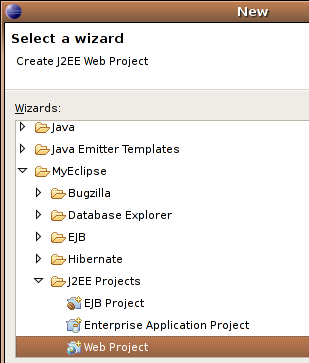
I want to continue this project as web application, so I chose this kind of project. When you do not have MyEclipse installed you may use a Java project or have a look at the tutorial at http://www.laliluna.de/articles/posts/webprojects-eclipse-jbosside-tutorial-en.html to create a web project.
Press Ctrl+n (Strg+n) and choose new webproject.
Call your project SpringJdbc.
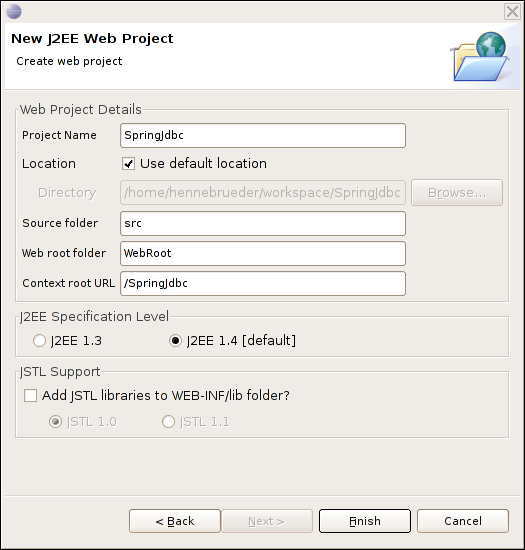
In the next step we need to add the missing libraries. MyEclipse provides a wizard to do this. For other user see below how to add libraries.
Using MyEclipse right click on your project -> MyEclipse -> Add Spring capabilities. We will need the DAO/ORM libraries and the core.
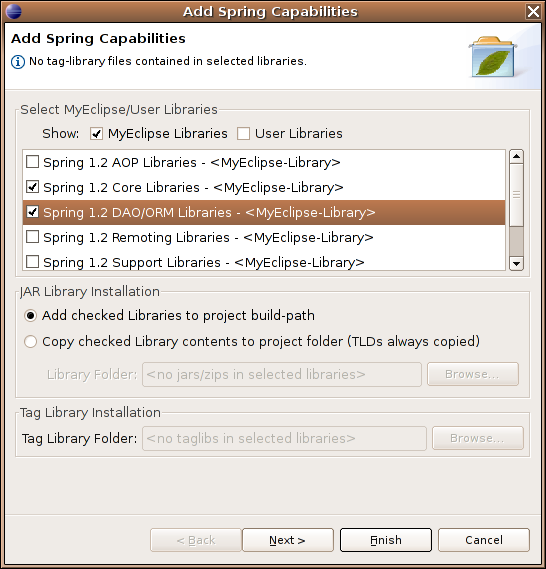
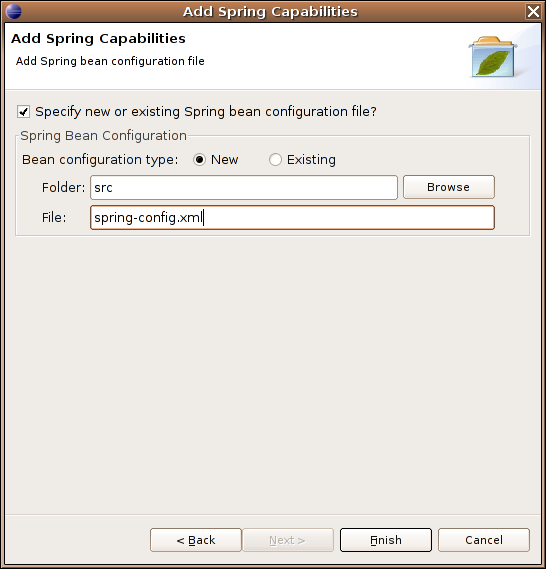
In the next step you can create a Spring configuration file.
If you do not use MyEclipse download Spring from the website http://www.springframework.org We used version 1.2.6
Unpack all the spring libraries from the zip or tgz file in a directory. Libraries have names like spring.jar.
Open the libraries dialog in the project properties (Alt+Enter) -> Java Build Path -> Libraries -> Add external jar
Below you can see the libraries added by MyEclipse. This is by far to much. You will not need spring-hibernate, dbcp, ibatis and toplink libraries.
JDBC
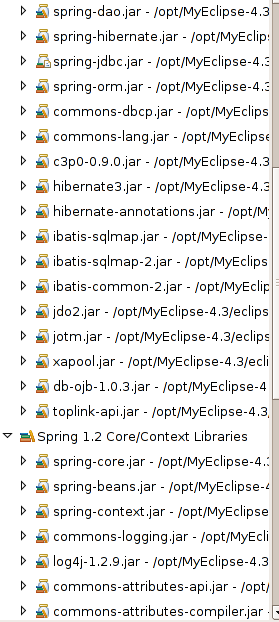
Libraries
You will need a jdbc driver for your database. I used PostgreSQL. You can get the driver from http://jdbc.postgresql.org/ . You can use the JDBC 3 driver if you are running a current j2sdk like 1.4 and 1.5/5.0.
For MySQL you can use the MySQL connector which can be found at http://www.mysql.com/products/connector/j/
Configure logging
Spring depends on log4j. If you use MyEclipse this is already provided with the spring libraries. If not you can find the libraries here http://logging.apache.org/log4j/docs/index.html
Create a log4j.properties file in the src directory and add the following code to have a debugging output to the console.
### direct log messages to stdout ###
log4j.appender.stdout=org.apache.log4j.ConsoleAppender
log4j.appender.stdout.Target=System.out
log4j.appender.stdout.layout=org.apache.log4j.PatternLayout
log4j.appender.stdout.layout.ConversionPattern=%d{ABSOLUTE} %5p %c{1}:%L - %m%n

### direct messages to file hibernate.log ###
#log4j.appender.file=org.apache.log4j.FileAppender
#log4j.appender.file.File=hibernate.log
#log4j.appender.file.layout=org.apache.log4j.PatternLayout
#log4j.appender.file.layout.ConversionPattern=%d{ABSOLUTE} %5p %c{1}:%L - %m%n

### set log levels - for more verbose logging change 'info' to 'debug' ###

log4j.rootLogger=debug, stdout
Create the database and tables
I use PostgreSQL in the tutorial text but you can find MySQL specific source code in the source code, I provided.
Create a database named library and use the following script to create the tables.
PostgreSQL
CREATE TABLE book
(
id serial,
title text,
author text,
borrowsBy int4,
 primary key (id)
) ;
MySQL
CREATE TABLE `book` (
`id` INT NOT NULL AUTO_INCREMENT ,
`title` VARCHAR( 255 ) NOT NULL ,
`author` VARCHAR( 255 ) NOT NULL ,
`borrowedby` INT,
PRIMARY KEY ( `id` )
) TYPE = INNODB ;
Why do I use PostreSQL?
I like PostgreSQL very much. It provides features like Triggers, Stored Procedures, Views for quite a long time compared to MySql, it has a better licence model, a wide choice of languages to create stored procedures including pg/psql, c and others. I have heard ;-) that it is better scalable when you are not having a simple web application reading data but a large scale application using transactions, triggers, stored procedures and a lot of complex queries.
The structure
The solution should be portable between different database server, so we need to encapsulate the access to the database. A good way to make your application not aware of a special implementation, is to use an interface.
Why interfaces are useful?
I will give you some reasons in favour of using interfaces. Imagine you wrote a class dealing with your MySql database.
public class MyLibrary {
	public void doSomething(){
		// I will call a MySQL database now
	}
	public void doSomethingElse(){
		// I will call a MySQL database now
	}
}
When you create a different class dealing with a PostgreSQL database you will have to replace the MyLibrary class with the MyLibraryPostgreSQL class everywhere.
When you create an interface for example:
public interface MyLibrary {
	public abstract void doSomething();
	public abstract void doSomethingElse();
}
and write implementations like the following:
public class MyLibraryMySQLImp implements MyLibrary {
	public void doSomething(){
		// I will call a MySQL database now
	}
	public void doSomethingElse(){
		// I will call a MySQL database now
	}
}
you can pass the interface as parameter to your business method.
Void businessMethod(MyLibrary myLib){
myLib.doSomething();
}
Your code no longer knows which implementation it got and will work on any implementations.
Creating the basic classes
Class book
The class book is a normal Java bean with private attributes and public getter/setter and constructor method.
Press Ctrl + n (Strg + n) and select class to open the class wizard. Choose Book as name and de.laliluna.library as package. Add the private attributes and generate all getters and setters (context menu -> source -> generate getters/setters; consider to define a shortcut key to do this). Add the contructor methods.
package de.laliluna.library;

public class Book {
	// unique number to indentify the book
	private Integer id;
	// hm the title
	private String title;
	// the authors name
	private String author;
	// null or the id of the client who borrowed the book
	private Integer borrowedBy;

	public Book(){

	}

	public Book(Integer id, String title, String author, Integer borrowedBy){
		this.setId(id);
		this.setTitle(title);
		this.setAuthor(author);
		this.setBorrowedBy(borrowedBy);
	}

	public String getAuthor() {
		return author;
	}
	public void setAuthor(String author) {
		this.author = author;
	}
	public Integer getBorrowedBy() {
		return borrowedBy;
	}
	public void setBorrowedBy(Integer borrowedBy) {
		this.borrowedBy = borrowedBy;
	}
	public Integer getId() {
		return id;
	}
	public void setId(Integer id) {
		this.id = id;
	}
	public String getTitle() {
		return title;
	}
	public void setTitle(String title) {
		this.title = title;
	}
}
Interface and Implementation
Press Ctrl+n (Strg+n) and select interface to create a new interface named libraryDao.
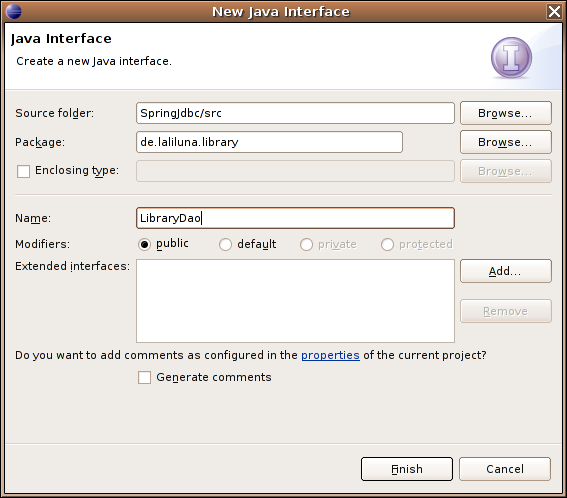
Add the following code.
package de.laliluna.library;
import java.util.List;

public interface LibraryDao {

	/**
	 * gets id generated from db and insert book in database
	 * @param book
	 * @return book with new generated id
	 */
	public abstract Book insertBook(Book book);

	/**
	 * updates the book in the database
	 * @param book
	 */
	public abstract void updateBook(Book book);

	/**
	 * deletes book in the database
	 * @param book
	 */
	public abstract void deleteBook(Book book);

	/**
	 * loads all books from the database and puts them in a java.util.List
	 * @return list of books
	 */
	public abstract List getBooks();

}
Create a new class libraryDaoImp and add the interface you just created to the interface list. Make sure to check the options to generate abstract methods and comments.
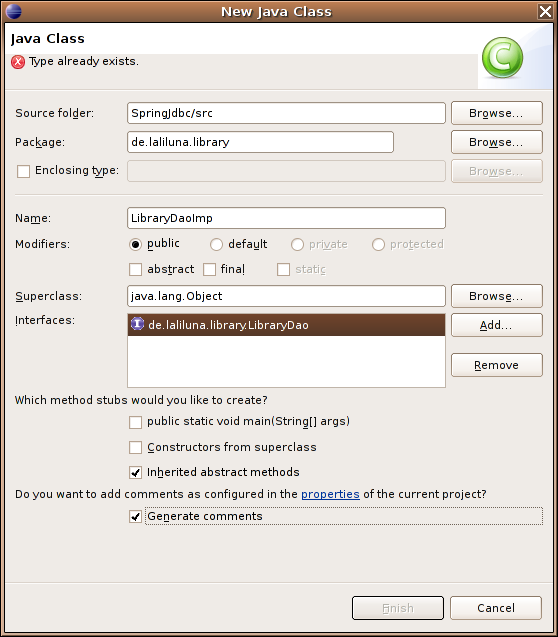
We will use a Spring template to access the database. A spring template keeps us away from dealing with JDBC datasources and connections. Add a private attribute named jdbcTemplate and generate (context menu -> source -> generate getter/setter) or type the setter method. In addition we will need an incrementer to get the value of an autoincrement field from the database. Create it as private attribute and generate the setter method.
The method insertBook which is shown below and the other interface methods should be generated when you followed our instruction.
public class LibraryDaoImp implements LibraryDao {

	private JdbcTemplate jdbcTemplate;
	private DataFieldMaxValueIncrementer bookIncrementer;

	public void setJdbcTemplate(JdbcTemplate jdbcTemplate){
		this.jdbcTemplate = jdbcTemplate;
	}

	public void setBookIncrementer(DataFieldMaxValueIncrementer bookIncrementer) {
		this.bookIncrementer = bookIncrementer;
	}

	/* (non-Javadoc)
	 * @see de.laliluna.library.LibraryDao#insertBook(de.laliluna.library.Book)
	 */
	public Book insertBook(Book book) {
		// TODO Auto-generated method stub
		return null;
	}
..........................
To insert, update and to delete needs no further preparation, so have a look at the source code:
	public Book insertBook(Book book) {
		//get next autoincrement value
		Integer id = bookIncrementer.nextIntValue();
		book.setId(id);
		String sql = "insert into book (id, title, author) values (?,?,?)";
		Object args []= new Object[] { id, book.getTitle(), book.getAuthor() };
		int types[] = new int[] { Types.INTEGER, Types.VARCHAR, Types.VARCHAR };
		jdbcTemplate.update(sql, args, types);

		return book;
	}
	public void updateBook(Book book) {
		String sql = "update book set title=?, author=?, borrowedby=? where id = ?";
		Object args []= new Object[] { book.getTitle(), book.getAuthor(), book.getBorrowedBy(), book.getId() };
		int types[] = new int[] { Types.VARCHAR, Types.VARCHAR, Types.INTEGER, Types.INTEGER };
		jdbcTemplate.update(sql, args, types);
	}

	public void deleteBook(Book book) {
		String sql = "delete from book where id = ?";
		Object params[] = new Object[] {book.getId()};
		int types[] = new int [] {Types.INTEGER};
		jdbcTemplate.update(sql, params, types);
	}
The jdbc template provides a convenient method to encapsulate all the handling with the datasource and the connection. We will configure the datasource later. Each query needs the sql, the array of parameters to the query and an array of types, showing which kind of parameters we are passing.
You need not to pass the types but may have Spring to find out which types are passed. But this can be a problem when passing null values. So just don't do it.
We use book objects anywhere so when we read data from the database we will have to map the resultset of a query to the class. The spring JdbcTemplate provides a convenient method to read data but this method needs a RowMapper, i.e. a class implementing the RowMapperInterface. Spring will call the method mapRow for each row in the resultset to map the resultset to the class.
package de.laliluna.library;

import java.sql.ResultSet;
import java.sql.SQLException;
import org.springframework.jdbc.core.RowMapper;

/**
* rowmapper is used by Spring to read a line from a database table
* and to fill an instance of the class with the values
*/
public class BookRowMapper implements RowMapper {

	public Object mapRow(ResultSet rs, int rowNum) throws SQLException {
		// I use JDK 5 so I do not have to wrap int with an Integer object
		Book book = new Book(rs.getInt("id"), rs.getString("title"), rs.getString("author"),
				rs.getInt("borrowedby"));
		return book;
	}
}
Now, we can create our getBooks method. It is really simple isn't it.
	public List getBooks() {
		String sql = "select * from book";
		return jdbcTemplate.query(sql, new BookRowMapper());
	}
Imagine you would have to create a connection for each access of the database, close it and handle all the possible exceptions.
Adding inversion of control
In our sourcecode we used a JbcTemplate and a DataFieldMaxValueIncrementer but where does this come from. We could of cause create this in our application or we can configure this in a spring configuration file. Anyway, our LibraryDaoImp has not to deal with this business but receives these things from the outside world. This is called inversion of control. Our class does not decide from where to get things, because our class should do business logic and not deal with configuration settings etc.
Configuration in Java classes
We need to create a datasource, a jdbcTemplate and an incrementer to create finally our LibraryDaoImp. We will put all of this in an init method.
Create a new class TestClient in the package test.de.laliluna.library. We will create a test to use our insert, update, delete and list methods.
package test.de.laliluna.library;

import java.util.Iterator;
import java.util.List;
import org.springframework.jdbc.core.JdbcTemplate;
import org.springframework.jdbc.datasource.DriverManagerDataSource;
import org.springframework.jdbc.support.incrementer.DataFieldMaxValueIncrementer;
import org.springframework.jdbc.support.incrementer.PostgreSQLSequenceMaxValueIncrementer;
import de.laliluna.library.Book;
import de.laliluna.library.LibraryDao;
import de.laliluna.library.LibraryDaoImp;

public class TestClient {

	/**
	 * @param args
	 */
	public static void main(String[] args) {
		TestClient testClient = new TestClient();
		testClient.testUsingJava();
	}

	private void testUsingJava() {
		LibraryDao libraryDao = init();
		testInsertUpdateDelete(libraryDao);
	}

	private void testInsertUpdateDelete(LibraryDao libraryDao) {
		// insert a book
		Book book = libraryDao.insertBook(new Book(null,
				"My life as Java bean", "Sebastian", null));
		System.out.println("List books:");
		List famousBooks = libraryDao.getBooks();
		for (Iterator iter = famousBooks.iterator(); iter.hasNext();) {
			Book element = (Book) iter.next();
			System.out.println("Book: " + element.getTitle() + " written by "
					+ element.getAuthor());
		}
		//update a book
		book.setTitle("My life as Java bean, edition 2");
		libraryDao.updateBook(book);
		System.out.println("List books:");
		famousBooks = libraryDao.getBooks();
		for (Iterator iter = famousBooks.iterator(); iter.hasNext();) {
			Book element = (Book) iter.next();
			System.out.println("Book: " + element.getTitle() + " written by "
					+ element.getAuthor());
		}
		//delete the book
		libraryDao.deleteBook(book);
		System.out.println("List books:");
		famousBooks = libraryDao.getBooks();
		for (Iterator iter = famousBooks.iterator(); iter.hasNext();) {
			Book element = (Book) iter.next();
			System.out.println("Book: " + element.getTitle() + " written by "
					+ element.getAuthor());
		}
	}

	private LibraryDao init() {
		JdbcTemplate jdbcTemplate = new JdbcTemplate(getDataSource());
		DataFieldMaxValueIncrementer incrementer = new PostgreSQLSequenceMaxValueIncrementer(
				getDataSource(), "book_id_seq");

		LibraryDao libraryDao = new LibraryDaoImp();
		((LibraryDaoImp) libraryDao).setBookIncrementer(incrementer);
		((LibraryDaoImp) libraryDao).setJdbcTemplate(jdbcTemplate);
		return libraryDao;
	}

	private static DriverManagerDataSource getDataSource() {
		DriverManagerDataSource dataSource = new DriverManagerDataSource();
		dataSource.setDriverClassName("org.postgresql.Driver");
		dataSource.setUsername("postgres");
		dataSource.setPassword("");
		dataSource.setUrl("jdbc:postgresql://localhost/library");
		return dataSource;
	}
}
Configuration with Spring config files
To use the Spring config file we need to add a method to our test class and import two Spring classes.
import org.springframework.beans.factory.xml.XmlBeanFactory;
import org.springframework.core.io.ClassPathResource;
.......

	public void testUsingSpringConfig() {
		ClassPathResource classPathResource = new ClassPathResource(
				"spring-config.xml");
		XmlBeanFactory beanFactory = new XmlBeanFactory(classPathResource);
		LibraryDao libraryDao = (LibraryDao) beanFactory.getBean("libraryDao");
		testInsertUpdateDelete(libraryDao);
	}
The code above will read a resource from the spring configuration file. The bean factory reads the resource and does what is a factory's job: it produces beans.
We can call the factory to produce a full initialized libraryDao.
Now we will create the configuration file. Create a file named spring-config.xml in the /src directory.
<?xml version="1.0" encoding="UTF-8"?>
<!DOCTYPE beans PUBLIC "-//SPRING//DTD BEAN//EN" "http://www.springframework.org/dtd/spring-beans.dtd">

<beans>
 <bean id="libraryDao" class="de.laliluna.library.LibraryDaoImp" singleton="false">
 <property name="jdbcTemplate">
 <ref bean="jdbcTemplate" />
 </property>
 <property name="bookIncrementer">
 <ref bean="bookincrementer" />
 </property>
 </bean>

 <bean id="jdbcTemplate" class="org.springframework.jdbc.core.JdbcTemplate">
 <constructor-arg>
 <ref bean="datasource" />
 </constructor-arg>
 </bean>
 <bean id="bookincrementer" class="org.springframework.jdbc.support.incrementer.PostgreSQLSequenceMaxValueIncrementer">
 <constructor-arg>
 <ref bean="datasource" />
 </constructor-arg>
 <constructor-arg><value>book_id_seq</value> </constructor-arg>
 </bean>
 <bean id="datasource" class="org.springframework.jdbc.datasource.DriverManagerDataSource">
 <property name="driverClassName" value="org.postgresql.Driver" />
 <property name="url" value="jdbc:postgresql://localhost/library" />
 <property name="username" value="postgres" />
 <property name="password" value="" />
 </bean>
</beans>
The resource file finds a libraryDao configuration first. It needs to set two properties which are referencing other beans
<ref bean="jdbcTemplate" />
It finds the jdbcTemplate bean configuration.
Its constructor needs a datasource, so it creates this first.
 <constructor-arg>
 <ref bean="datasource" />
 </constructor-arg>
The properties driverClassName, url, username and password are set, i.e. the setDriverClassName, setUrl, ... methods are called.
Now, the jdbcTemplate gets created and then the book incrementer and then the libraryDao.
Test your application
You can now run your application and see that both approaches are working. The approach using a configuration file is the standard approach of Spring to wire beans. I wrote the ?Java way? to explain what is happening behind the scenes. (Even if you could do the ?Java way? when you know how to deal with factories, etc).
Spring does provide a lot of features to wire beans in configuration files. Have a look at our other tutorials or at the reference.
Outlook
The following topics can be found out by yourself, are comping up in the next tutorials or can be learned in our seminars.
Replacing the datasource with a connection pool
The use of a simple datasource is not adequate for larger applications. Spring provides apdapters to connection pools like dbcp or pools coming from JNDI contexts. The latter is provided by Tomcat, JBoss, Websphere etc.
Object Relational Mapping
We should replace the JDBC access with a Object relational mapping solution like Hibernate, because Hibernate provides already all we have just created by hand and even more.
Alternative implementation
We could use MappingSqlQuery or SqlUpdate objects as alternative to the implementation we chose.
Adding transactions to our application
Once we add business methods dealing with multiple queries in the same business process, we will have to use transactions. Spring provides adapters so that we could use the transaction manager from J2EE solutions or transactions as provided from the database.
Copyright and disclaimer
This tutorial is copyright of Sebastian Hennebrueder, laliluna.de. You may download a tutorial for your own personal use but not redistribute it. You must not remove or modify this copyright notice.
The tutorial is provided as is. I do not give any warranty or guaranty any fitness for a particular purpose. In no event shall I be liable to any party for direct, indirect, special, incidental, or consequential damages, including lost profits, arising out of the use of this tutorial, even if I has been advised of the possibility of such damage.