Java security in web application, typical attacks, Tomcat security
This article gives an overview about different attack mechanisms against Java web applications and J2EE applications. It introduces available security concepts in Java like JAAS and Sandbox security. Furthermore, security related design patterns are explainedThe article is based on a workshop, I attended on the Jax Conference 2006 in Wiesbaden Germany. The topic was Java EE Application Security and Security Patterns. It was hold by Bruce Sams (www.optimabit.de). I added some information from other resources as well and created some more detailed examples.
General
Author: Sebastian Hennebrueder
Date: March, 3rd 2007
Article as PDF: http://www.laliluna.de/download/java-security-tutorial.pdf
Remove Comments
Delete comments in deployed documents. An intruder could use this information to attack your side. You should not use any HTML comments in your JSP.
<!-- HTML comment: looks up user data in table tuser -->
Even if you use a comment like the following in your JSP, there can be a situation, in which the JSP is not rendered and the comment is visible to a intruder (-> directory browsing).
<% /* JSP comment: looks up user data in table user */ %>
Directory Browsing
Directory browsing allows other people to see all your JSP files without being rendered. They could retrieve valuable information about your application from these files. You have multiple options to protect your JSP files:
-
Deactive directory browsing on server and application level.
-
Protect the JSP directories with JAAS.
-
Change the default servlet coming with Tomcat. This servlet does provide the browsing feature.
Multiple Level of Security
Features like Directory Browsing, Session Time Out can be configured on server level and application level in the web.xml. You should have tight server level settings so that a incautious developer have a secure application by default.
Typical problems of web applications
-
Self made Session id
-
Incomplete validation of user input
-
Server configuration
Do not reinvent the Session handling. The session provided by nowadays application server should be secure. There might have been problems for some application servers in the early days but this is a long time ago.
Imagine you would use a timestamp as session. An intruder could easily take over an existing session by trying out current timestamps.
Normally a Tomcat session looks like
http://localhost/MyApplication/listUser.do;jsessionid=2CFB532547A143436A46727B3B4C7C0A
If you use a timestamp as session id you will have something like:
http://localhost/MyApplication/listUser.do;mySessionId=2006-05-25-19:31:050
Even if your session id is more complicated than a timestamp, you should keep in mind that an attacker could create a list of sessions in search for a pattern in your session id.
Sandbox Security
The Java virtual machine allows to define access permission to the filesystem, classes, sockets, JVM attributes for all applications running in the JVM. Below you can find an extract of the properties provided with Tomcat. This is a powerful option to set up a secure application server which is not able to get access to other application server.
grant {
// Required for JNDI lookup of named JDBC DataSource's and
    // javamail named MimePart DataSource used to send mail
    permission java.util.PropertyPermission "java.home", "read";
    permission java.util.PropertyPermission "java.naming.*", "read";
    permission java.util.PropertyPermission "javax.sql.*", "read";

    // OS Specific properties to allow read access
    permission java.util.PropertyPermission "os.name", "read";
    permission java.util.PropertyPermission "os.version", "read";
    // Required for OpenJMX
    permission java.lang.RuntimePermission "getAttribute";

	// Allow read of JAXP compliant XML parser debug
	permission java.util.PropertyPermission "jaxp.debug", "read";

    // Precompiled JSPs need access to this package.
    permission java.lang.RuntimePermission "accessClassInPackage.org.apache.jasper.runtime";
    permission java.lang.RuntimePermission "accessClassInPackage.org.apache.jasper.runtime.*";
};

grant codeBase "file:${catalina.home}/webapps/examples/-" {
      permission java.net.SocketPermission "dbhost.mycompany.com:5432", "connect";
      permission java.net.SocketPermission "*.noaa.gov:80", "connect";
};
If you allow a JVM to access JNI you can escape from this protection. JNI allows to start applications developed in languages like C, Delphi etc.
Some commercial application servers allow to set up sandbox security on a per application level. This is a very powerful feature in environments where security is extremely important or where a lot of different applications are running.
JAAS
Java Authentication and Authorization Service (JAAS) is a standard mechanism implemented in all application server to protect your applications. The login mechanisms is implemented outside your application but you can access the user and his roles within your application.
In a web application you can need to do the following to activate JAAS:
Add a security constraint
In the following application, I added a constraint in the web.xml for all calls to any files and folders below my application name. I defined that only users with the role application have access to this file. You can define access options like post, get or put or required protocols like SSL as well.
<?xml version="1.0" encoding="UTF-8"?>
<web-app xmlns="http://java.sun.com/xml/ns/j2ee" xmlns:xsi="http://www.w3.org/2001/XMLSchema-instance"
xsi:schemaLocation="http://java.sun.com/xml/ns/j2ee http://java.sun.com/xml/ns/j2ee/web-app_2_4.xsd" version="2.4">

................. snip ...............
 <security-constraint>
    <display-name>Laliluna application</display-name>
    <web-resource-collection>
      <web-resource-name>Protected Area</web-resource-name>
      <!-- Define the context-relative URL(s) to be protected -->
      <url-pattern>/*</url-pattern>
    </web-resource-collection>
    <auth-constraint>
      <!-- Anyone with one of the listed roles may access this area -->
      <role-name>application</role-name>
    </auth-constraint>
  </security-constraint>
...... snip .............
</web-app>
Add a login mechanism
Servlet containers like Resin, Tomcat etc offers different kind of login mechanisms. Typical mechanisms are a form popping up in your browser or an individual designed login from. Below we defined a simple login which will popup in the Browser.
<?xml version="1.0" encoding="UTF-8"?>
<web-app xmlns="http://java.sun.com/xml/ns/j2ee" xmlns:xsi="http://www.w3.org/2001/XMLSchema-instance"
xsi:schemaLocation="http://java.sun.com/xml/ns/j2ee http://java.sun.com/xml/ns/j2ee/web-app_2_4.xsd" version="2.4">

................. snip ...............

  <login-config>
    <auth-method>BASIC</auth-method>
    <realm-name>Telekom Training Export</realm-name>
  </login-config>
  <!-- Security roles referenced by this web application -->
  <security-role>
    <role-name>application</role-name>
  </security-role>
</web-app>
Configure a Realm
Finally you must configure a place where the application server can lookup user, roles and passwords.
This can be file based, LDAP or a database. Below you can find a configuration in the JBoss application server.
    <!-- Security domain for JBossMQ -->
<application-policy name = "jbossmq">
       <authentication>
          <login-module code = "org.jboss.security.auth.spi.DatabaseServerLoginModule"
             flag = "required">
             <module-option name = "unauthenticatedIdentity">guest</module-option>
             <module-option name = "dsJndiName">java:/DefaultDS</module-option>
             <module-option name = "principalsQuery">SELECT PASSWD FROM JMS_USERS WHERE USERID=?</module-option>
             <module-option name = "rolesQuery">SELECT ROLEID, 'Roles' FROM JMS_ROLES WHERE USERID=?</module-option>
          </login-module>
       </authentication>
    </application-policy>
To sum up, JAAS allows you to plug in security in a very flexible manner. You may consider not to reinvent a security mechanisms for your application.
Context of a Web application
A JAAS login is only valid for one web application. Even if the same role is applicable in two web applications you would have to login in again. The session will not be reused in the other application.
JAAS and EJB
Enterprise Java Beans are by default unprotected. If you implement Remote interfaces for your EJBs, they are accessible from every PC having access to your server. To protect your EJB you have different options
-
do not use remote interfaces (if you do not need them)
-
use JAAS to protect your EJBs
-
protect the access of protocols (normally RMI) to your server
Role Linking
If you have a lot of applications running on the same server, you will have sooner or later applications having the same roles and users. In most cases this is not a wanted situation. The solution is to link a application user role to another external role.
Single Sign On
There are two approaches for Single Sign on. The first approach is session sharing across applications. The second approach is two move the login mechanisms outside your application server.
The latter case requires a security token which must be passed to the application. If you are interested in this topic you may have a look at Kerberos Single Sign On.
SQL Injection in Java Web applications
Imagine a login form in a web application where the user inputs a user name and a password.
Your application issues a SQL statement:
select username from user where username= 'Peter' and password = 'secret'
If the user inputs for password something like
secret' or '1'='1
Your query will be something like
select username from user where username= 'Peter' and password = 'secret' or '1'='1'
The same kind of injection can happen with any kind of search form. If a intruder wants to reduce your product prices he could input the following in your search form.
Blablub';update product set price = 1 where product_id=55 and '1'='1
Your search query will be something like
select from product where name = 'Blablub';update product set price = 1 where product_id=55 and '1'='1'
These kind of attacks are typical for applications using JDBC directly. A good protection is to use prepared statements or Object Relational Mapping solutions like Hibernate, EJB or JDO.
Java Script attacks
Cross side scripting
When a intruder can take over your session he is working with your account. Imagine somebody takes over your session in a Internet Shop and orders products. You will get a lot of problems.
An intruder could post links into a forum to a internet shop having very low prices. Once you click on this link the website is loaded into a frame. Outside the frame there is a Java script application sending input of your frame or your session to another website. Once the intruder has access to your session we will hold your session open to misuse it later or when you are not available.
This is not a problem specific to Java applications but to web applications in general.
You could enforce that your application is not running inside another frame, to solve this security problem.
Another approach to have a improved security is to enforce a maximum session life time. If your users can accept that their session is not living longer than two hours, you could invalidate all older sessions periodically. This makes it impossible for intruders to keep sessions alive for a longer time.
Attacking forms
If you validate forms using JavaScript or you keep information in your form with hidden fields you can be attacked easily. Let us assume that we have a multi page form and you save the customer level in a hidden field. Dependent on the customer level a customer gets a special discount.
Using a web proxy like Scarab you can easily rewrite hidden fields and get a special discount for your order.
Security Design Pattern
Secure Transport Object (STO)
In distributed environments you have to transport serialized objects from one application server to another. The transport item could be a message, a serialized object of a Remote EJB or any other kind of data on a enterprise service bus.
The connection between your application server could be insecure or your transport item could have to pass multiple intermediates.
In this situation the pattern Secure Transport Object is a good choice to protect your data. It is a Data Transfer Object (DTO) which is protected by encryption. The sender encrypts the data using a password or a public key. The STO passes any number of intermediates and reaches the target which decrypts the STO using the same password or a private key.
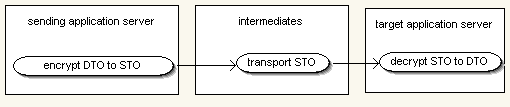
You could implement a more fine grained approach as well, allowing that only some attributes of an object are protected.
Intercepting Validator Pattern
In order to validate all input in a proper manner and to protect your application against JavaScript or SQL injection you can use the Intercepting Validation Pattern. Instead of validating input decentralized in your application you have a central mechanism to validate the user input.
Secure Based Action
This pattern defines a single point of entry for your application and enforces security restriction. For example, you could implement a Filter Servlet validating that you are allowed to call the specified method. In a Struts application you could overwrite the default controller and add the validation of security constraints.
Copyright and disclaimer
This tutorial is copyright of Sebastian Hennebrueder, laliluna.de. You may download a tutorial for your own personal use but not redistribute it. You must not remove or modify this copyright notice.
The tutorial is provided as is. I do not give any warranty or guaranty any fitness for a particular purpose. In no event shall I be liable to any party for direct, indirect, special, incidental, or consequential damages, including lost profits, arising out of the use of this tutorial, even if I has been advised of the possibility of such damage.