MyEclipse JavaScript editor for eclipse
This paper describes the new and improved editors of MyEclipse for JavaScript and CSS files.
General
Author:
Sascha Wolski
http://www.laliluna.de/tutorials.html
Date:
April, 28 2005
Software:
Eclipse 3.x
MyEclipse 3.8.x
PDF Version
http://www.laliluna.de/assets/tutorials/myeclipse-javascript-editor-en.pdf
Javascript Editor
The JavaScript editor is available in HTML files and in separate JS files. In HTML files only the content assistant is supported. Syntax check and highlighting is only support in JS files.
Content Assist
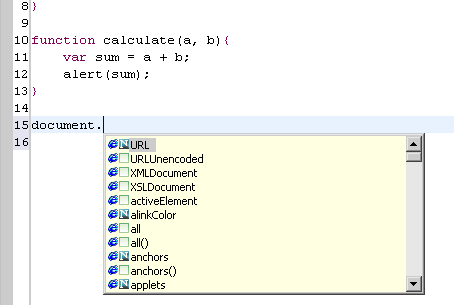
The new and improved JavaScript Editor has a content assistant as you probably know from normal Java classes. It's available for all JavaScript document objects. The content assistant shows all objects, Internet Explorer and Netscape specified.
Write the first letters of an object and press STRG + SPACE and the content assistant will show a list of all available objects.
The JavaScript Editor also supports syntax check and color coding.
Outline View
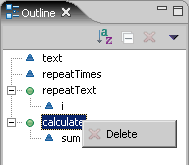
A new nice Outline View supports JavaScript methods and variables. If you select an item of the Outline View the cursor will jump to this method or variable within the editor. You can also delete a method or variable with the Outline View
Preview
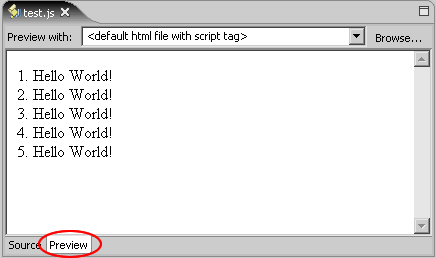
The next nice feature is the preview support. You can test your javascripts without using a external browser. You find the preview tab ob the bottom of the editor window.
JavaScript options
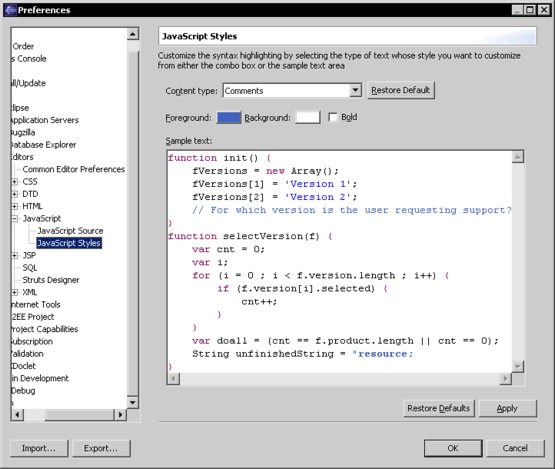
You can customize the JavaScript options within the preferences of MyEclipse. You can choose different options and change the styles for the color coding support. Open the MyEclipse Preferences dialog (Window > Preferences) and choose MyEclipse > JavaScript.