What is Struts? Intro to a framework for web applications.
Explanation, what is helpful when you develop web applications and how you can easily map these requirements with struts. We want to provide you a understandable explanation for the Model-View-Controller Pattern.
Generals
Author:
Sascha Wolski
http://www.laliluna.de/tutorials.htmlPDF-Version des Tutorials:
http://www.laliluna.de/assets/tutorials/what_is_struts_en.pdf
Date:
November, 13st 2004
Table of Contents
What is Struts and which functions it offers for web applications 1
Generals 1
Introduction 2
Java Servlets 2
Java Server Pages (JSP) 2
Java Beans 2
Business logic 2
Why is struts helpful? 3
Separation of dialogs and business logic (functionality) 3
Advantage of separation 3
Central control 3
Advantages of the central control 4
Translation into the technical language 4
More helpfully capability characteristics 4
Internationalising 4
Error handling 5
Validation of input fields 5
Components of struts 5
Struts configuration 6
Introduction
This Tutorial will explain you, what struts is, how it builds itself up and why it is advantage to use it for your web application. First, I will provide you some informations about Java Servlets, Java Server Pages and Java Beans, because they are parts of struts.
Java Servlets
Servlets represents java programs that runs on a web server. They allow the developer to produce dynamic web sites with java.
A Servlet has the following tasks
-
It reads and processed data, which a user typed in a HTML form on a web page.
-
If necessary other informations will be processed. For Example what browser or system will be used.
-
It generate results with the existing data. It calls the business logic directly in the servlet or another class, which contain the logic or executes a database query.
-
The results will be formated. If the browser. If the Browser expects an answer in the HTML format, then the results must be formatted in accordance with the standard. It is possible to return different formats of data with a servlet. (gif, jpeg, doc, etc.).
-
Suitable answer parameters are set. Befor the servlet return the data to the browser, it sends some parameter. The parameter contains the format, that will returned by the servlet, what time the browser use to cache the site and some more.
-
Return the document, in the format that it sends befor, to the browser.
Java Server Pages (JSP)
JavaServer Pages (JSP) are text documents, which are similar to HTML Files. But you find also java code in the JSP File. JavaServer Pages allow you to mix regulare, static HTML with dynamic generated contents of servlets. The java code is inserted in the HTML document on a JSP File, differently to a servlet, where the HTML code is embedded in the java code.
Java Beans
Java Beans are nothing else as classes, which keep a fixed naming convention, defined by Sun, for their event processing and methods. The attributes (variables) of the java beans are private. The access to these attributes is managed by access methods. The java specification specify these access methodes (getter and setter methods). If a java bean contains a attribute name, you can set or get the value of the attributes with the methode setName() or getName().
Business logic
The business logic is the core of the application. The processes are implemented in the business logic to manage the data. For Example: when someone borrows a book in a library, that is a process in the business logic. The process change the state of the data (is the book borrowsed or not) or reads the state and then provide this information for a dialog.
This short outline should be sufficient, in order to understand the structure of struts.
Why is struts helpful?
Sepration of dialogs and business logic (functionality)
Some peoples develop web applications with Perl or PHP and implement their SQL Querys and the business logics directly in the HTML document.
The source code looks like the following example:
<html><head><title>Important title</title></head>
<body>
<someScript>
dbConnection = openDBConnection(someDB)
resultSet = dbConnection.executeQuery('select bookName from books')
loop over resultSet{
 print (resultSet.field('bookName') + '<br>')
}
</someScript>
</body></html>
You can develop in this way, when you use java servlets or JSP. It is convenient in small projects. But imagine you have 70 dialogs, many database querys in this dialogs and you want to define a field status, setting if a book is deleted or not.
Good luck
In order to alter functions and database querys easily, we should seperate these from the dialogs.
Advantage of separation
-
Changes on the functionality, without working in the dialogs.
-
Better overview, functionality not mixed with the dialogs.
-
Easy maintain a application
-
Different dialogs, but the same functionality
Central control
In order to control the interaction between the dialogs and business processes, you need a central control unit. This control unit manage all importants courses of the application, when which business process and which dialog will be used.
You have some disadvantages, if you implement the order of the processes directly to the business logic.
-
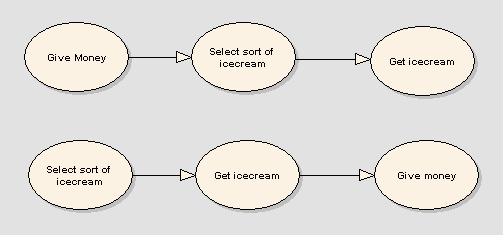
You can not reuse a part of the processes. In the following picture the process "Give Money" will bring you to the process "Select sort of icecream" every time.
-
If you want to change the order of the processes or add more options, you have to change it directly in the business logic.
Advantages of the central control
-
It is easy to change the order of the business processes.
-
Better overview, which dialogs will be used on which business processes.
-
A central place to control the interaction between business processes and dialogs.
Translation into the technical language
The name of this model is Model-View-Controller (MVC)
Model (business logic / business processes ? Java Beans)
View (dialogs ? JavaServer Pages)
Controller (central control unit - Java Servlets)
You will find more about the MVC later in this tutorial.
More helpfully capabilities
Internationalisation
If you do not want to translate a dialog, you put the dialog texts directly into the JSP File.
 <html:form action="someAction">
    Please give your name and the book title  <br>
		Name:
 <html:text property="name"/> <br>
  	Title:
 <html:text property="title"/> <br>
 <html:submit/>
 </html:form>
Struts support resources files. In this files you can define a key for a text.
bookDialog.formIntro=Please give your name and the title of the book.
bookDialog.inputName=Name:
bookDialog.bookTitle=Title:
This key can be used to diplay the text in the JSP file.
 <html:form action="someAction">
 <bean:message key="bookDialog.formIntro"/> <br>
 <bean:message key="bookDialog.inputName"/>
 <html:text property="name"/> <br>
 <bean:message key="bookDialog.bookTitle"/>
 <html:text property="title"/> <br>
 <html:submit/>
 </html:form>
Struts call the locale specific resource file by using the browser settings. You may overwrite this setting. It is quite easy to build an internationalized application with struts.
Error handling
Struts saves error messages in the business logic and can display this in the dialogs. You can show all errors or bind an error to a field (ex. Emailaddress incorrect) and show the error beside of it.
The error messages will be added to the resource files, so the errors can be internationalised too.
Validation of input fields
Whether an input field of a form contains a valid date, an email, a number or something else, in each application you have to check it. Struts supports a complete solution to validate form fields. You only have to define which form field will be checked and which error message will be displayed.
Components of struts
JavaServer Pages (JSP) take over the role of dialogs in struts,
Java Beans take over the business logic and business processes and
Java Servlets take over the central control unit
Thats why we talk about three great parts of struts.
Model (business logic / business processes ? Java Beans)
View (dialogs ? JavaServer Pages)
Controller (central control unit - Java Servlets)
The model represent the actual state of the application. Two kinds of java beans are used. There are java beans which contains the data of a form or data to display (ex. The books of a library) and java beans which includes the functionality of the application or call the business logic (when a user borrows a book).
The view component is responsible for the presentation of the data. The java server pages contain HTML, XML and Java Script, like a normal HTML site. Futhermore you can use java code. Struts provide tag libraries, a summary of functions, which can be use to prepare the data for displaying.
The last component is the controller. The controller manage the request of the web browser, which a user called by an address (URL). But also forward to an action which are execute and which dialogs will be used to display the informations.
The picture below illustrates the interaction between these components.
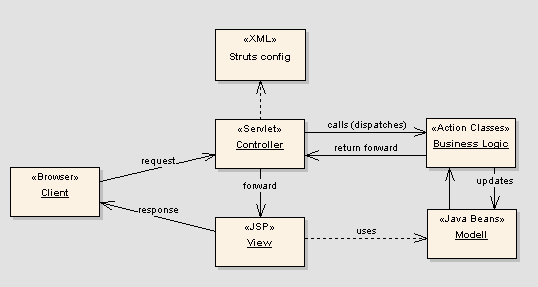
If the user sends a query with a browser, the controller(servlet) gets and processes this query. It decides which action will be called or to which view component it must be forward.
After the controller calls an action, the action can read data from a database and provide this data to the model component, java beans. The action (business logic) returns the "next step" to the controller. The controller checks what kind is the next step. (JSP View, next action, ...) and forwards to it.
The view component (JSP) reads the updated data from the model component and prepare this for the presentation. Then it sends the answer as HTML site back to the browser. The user sees the result of his query.
Struts configuration
Struts will be configured with various configuration files. The following files are very important.
web.xml
struts-config.xml
Struts-Tag-Bibliotheken
Properties-Dateien
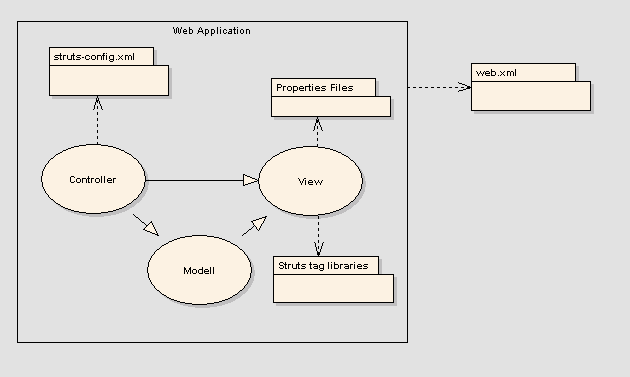
The illustration will show you, on which places struts use the configuration files.
web.xml
With the web.xml you configure the web server for the struts application. In this file you can set where the web server find the struts-config.xml and some other global properties.
struts-config.xml
The controller calls the business logic or a view with a name. The allocation of the names to the action classes or JSP Files(Views) will be set in the struts-config.xml. The advantage is that you can change the definition of the Workflows (Action Mapping), without using the long class names everytime. If you change a class name, you only have to change the name in the struts-config.xml. You don�t update any other part of your application.
Struts-Tag-Libraries
The Struts-Tag-Libraries, a summary of functions, extends the functionality of JavaServer pages. They support the internationalisation (multi-language) of your web application, and the easy creation of form elements.
Properties files
This files will be used to keep the internationalized textes of your web application. You can create a seperated properties file for each language, which contain all textes of the application.
Thats all with this short introduction in struts.
We hope the information give you a better overview.
Give Struts a try and go on to the first steps in struts tutorial.
Sascha und Sebastian